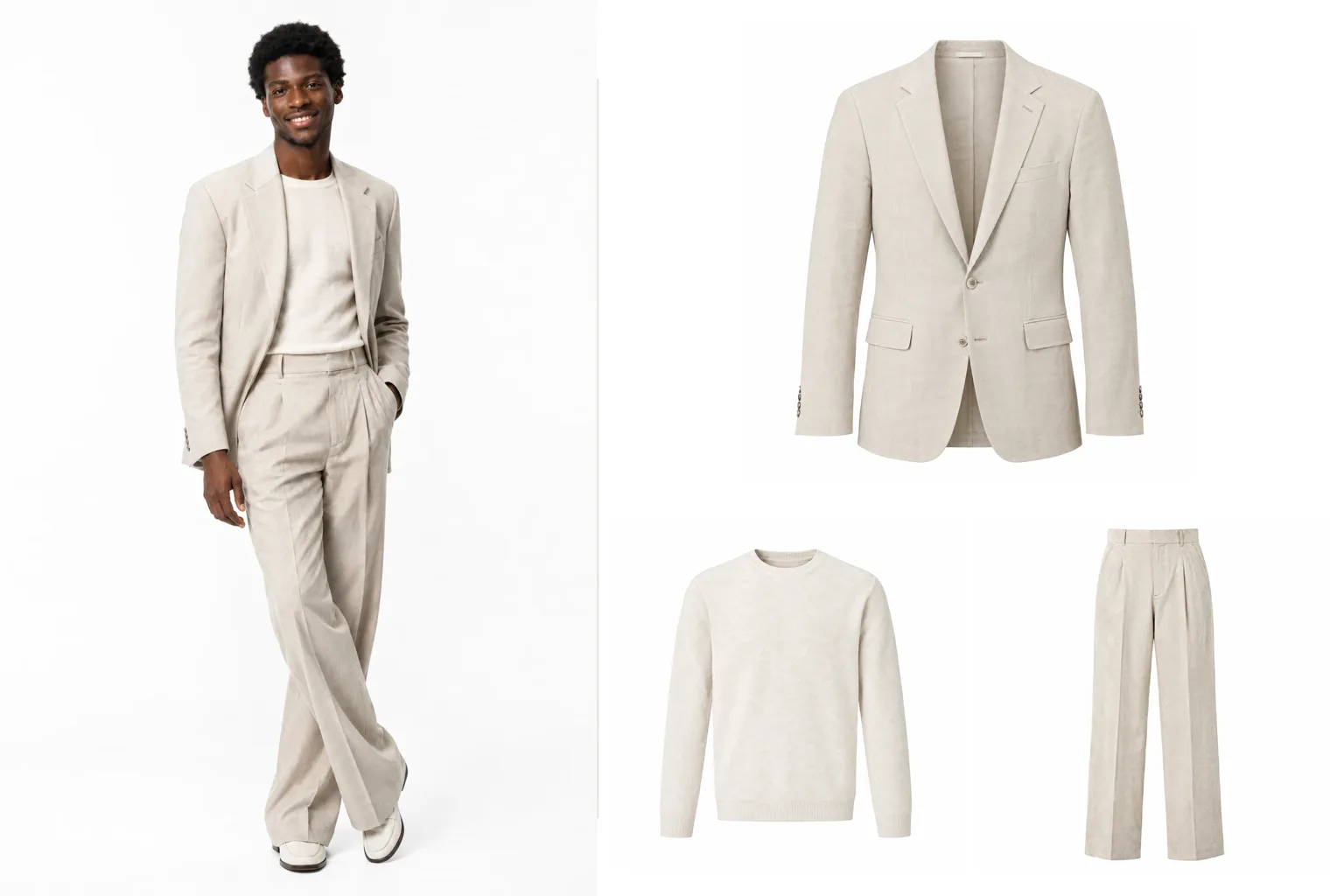
Fashion teams often have the opposite problem from everyone else. The campaign is shot, the lookbook is beautiful, and the product pages are still waiting, because every piece in those photos also needs its own clean packshot. That usually means pulling the samples back out, steaming them, and photographing each one again on its own.
Extract outfit skips that second shoot. Give it one photo of a styled look and it returns a separate product image for each garment in it.
How it works
Extract outfit is a shot type in the Studio. Each row on the board takes one outfit photo: an on-model shot, a street style picture, a lookbook frame, or an image you generated in Magnifiq.
- Find garments. A vision model looks at the photo and lists every garment, shoe and accessory it can see, most prominent first.
- Tick what you need. Everything starts ticked. Untick the pieces you do not sell or already have images of.
- Generate. You get one packshot per ticked garment, isolated from the person, the other clothing and the background, with its colour, fabric, pattern, seams, hardware and logos kept as they appear in the photo.
Credits follow the ticks, so a look with a jacket, a knit and trousers costs three images, not one per item the model found.
The board works in batches. Add a row per look, find the garments in each, and generate the whole lookbook's worth of packshots in one go. The results land in the gallery grouped as one outfit, ready to download or reuse.
Choose the presentation
The same five presentations as Materialize decide how every garment is shown:
| Presentation | What it is |
|---|---|
| Studio product | Clean catalogue shot on a neutral studio background |
| Flat shot | Garment laid flat, photographed overhead |
| Ghost mannequin | Worn 3D shape with no visible body, mannequin or hanger |
| On hanger | Hung, with natural drape |
| Mannequin | Fitted on a plain dress-form mannequin |
A direction field applies to every garment in every outfit, for things like "front view, show the brand label" or "warmer light". It is only applied where it makes sense for each piece, so asking for a visible label does not put one on a pair of socks.
Where it earns its place
Campaign to product page. The lookbook and the product grid come from the same shoot, so the pieces match exactly what customers saw in the campaign.
Listing every piece of a look. "Shop the look" modules need an image per item. Extract outfit gives you all of them from the hero shot.
Archive and resale. Old campaign photos often outlive the samples. If the photo exists, the packshot can too.
AI looks you built in Magnifiq. Dress an AI model in a Fashion shoot, then extract the outfit to get clean packshots that match the on-model images.
Keep going from the packshot
Every packshot is a normal gallery image. Send it through Colorize to produce the other colourways at exact hex values, put it on an AI model in a Fashion shoot, or open it in the Editor to remove the background. Set a focal point once and download the five channel crops (1:1, 4:5, 3:2, 9:16, 16:9) in one zip.
Honest limits
Extract outfit isolates what the photo shows. Where a part is hidden, such as a shirt under a buttoned coat or the back of a jacket, it continues the garment plainly and consistently rather than inventing details, but it cannot know what the hidden part really looks like. That is fine for lookbooks, editorial and "shop the look", and worth checking against the real sample before it becomes the only image on a product page.
The clearer the garment in the photo, the better the packshot: full-length, in focus, and not cropped by the frame or covered by a bag or an arm.
Use photos you have the rights to. Every packshot can be downloaded with a signed C2PA manifest and an IPTC label declaring it AI-generated, so the disclosure travels with the file wherever it is published.
Start generating your own product images
Bring the product photos you already have and generate your first studio-quality shots in minutes. Free plan, no credit card.
Get started free100 image credits every month, forever.
Related use cases
Flat Lays and Packshots
Clean catalogue packshots and overhead flat lays generated from the product images you already have: consistent lighting, consistent background, every marketplace ratio.
Ghost Mannequin Photography
Generate invisible-mannequin garment shots (the worn 3D shape with no body, mannequin or hanger visible) from a sketch and fabric, from photos of the garment itself, or from an outfit photo.
On-Model Fashion Photography Without a Shoot
Turn flat-lay and hanger shots of your garments into on-model imagery: real product, generated model, consistent identity, any environment, every aspect ratio your channels ask for.