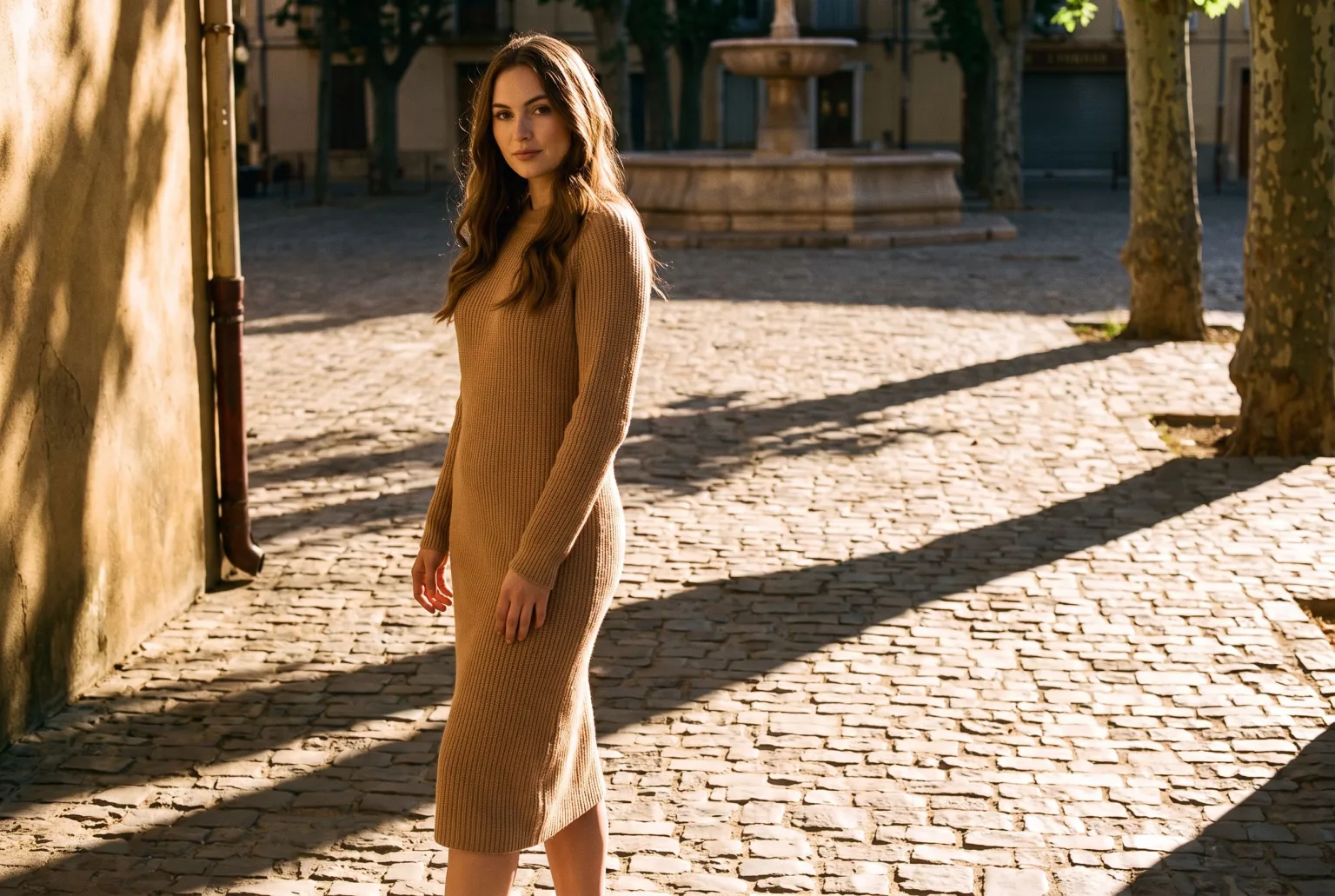
Almost nobody can name what is wrong with a bad composite, but everybody can see it. The subject is sharp and the street behind it is soft. The sun rakes across the wall and falls flat on the subject. Most of all, nothing touches the ground: there is no shadow where the subject meets the surface it is supposedly standing on.
That is the cut-out look, and it is the single clearest signal that an outdoor photo was assembled rather than taken.
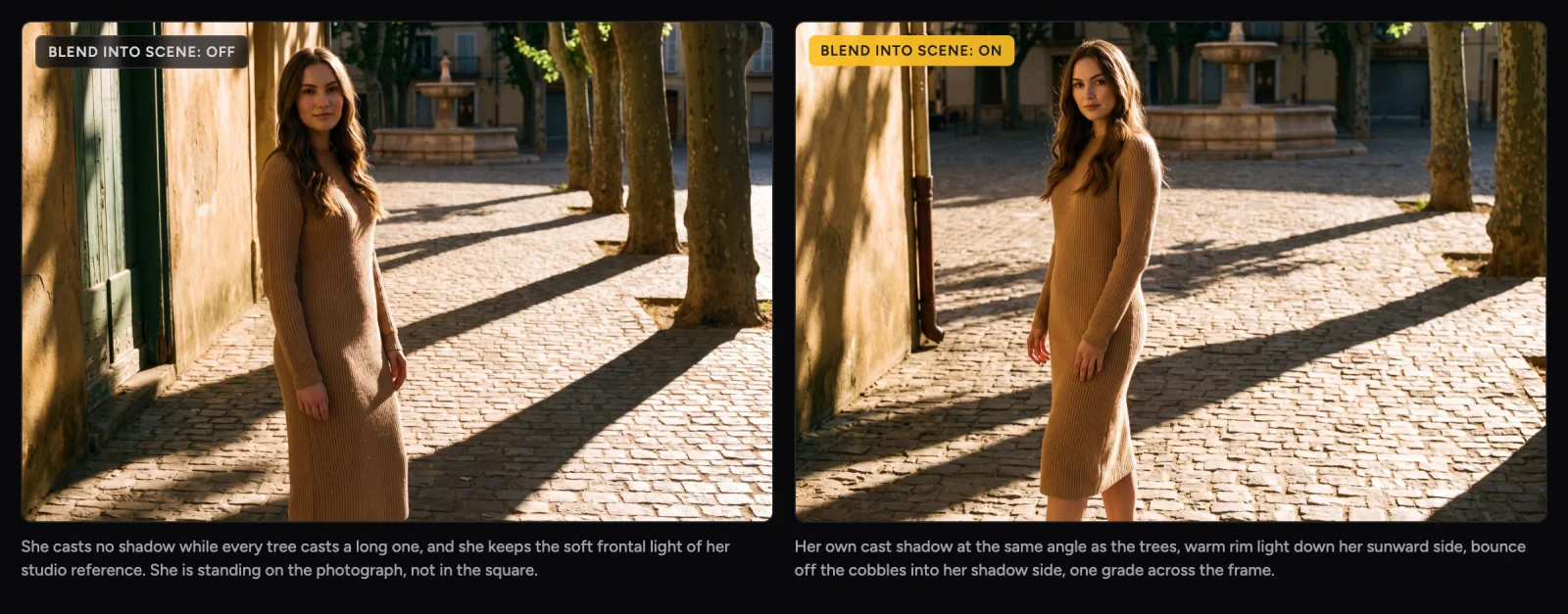
Both frames are one generation apart. Same two reference images (a studio shot of the model, and an empty photograph of the square), same prompt, same aspect ratio, same model. The only difference is the Blend Into Scene toggle.
Look at the cobblestones. On the left the plane trees throw long hard shadows and she throws none at all, and she is still lit by the soft frontal light of the studio she was photographed in. On the right she casts her own shadow at the trees' angle, the low sun puts a warm rim down her sunward side, and light bouncing off the stone fills her shadow side. Nothing else about the shot changed.
What actually gives it away
The tells are boringly consistent, and there are only a handful of them:
| Tell | What the eye notices |
|---|---|
| No contact shadow | The subject hovers a few millimetres above the surface |
| No cast shadow | Or one going the wrong way for the sun in the frame |
| Mismatched light direction | Flat frontal light on the subject, raking sun on everything else |
| Mismatched colour temperature | A cool subject in a golden scene, or the reverse |
| Hard edge | No light wrapping the outline, no colour bleed onto the rim |
| Uniform sharpness | Subject tack sharp against a background with real depth of field |
| Two colour grades | Different black points and highlight rolloff in one image |
| Grain on one layer only | Clean subject, grainy background |
Fixing one of these and missing the rest does not help. The image still reads as wrong, and the viewer still cannot say why.
What the modifier does
Blend Into Scene is a realism modifier in the Studio recipe, available on every shot type except Materialize and Colorize. Switch it on and its directive is appended to your prompt at render time, telling the model to treat the whole frame as one photograph shot on one lens and one sensor.
It covers the full list:
- Light. Matches the scene's direction, intensity and hardness, crisp shadows under direct sun and soft ones under overcast, plus colour temperature and white balance.
- Shadows. An accurate contact shadow where the product meets its surface, and a cast shadow at the correct angle and softness.
- Edges. Background light wraps the outline with subtle spill and colour bleed onto the rim, so it integrates instead of sitting on top.
- Depth of field. The product shares the background's focal plane, with focus falling off consistently rather than staying artificially sharp.
- Perspective. Camera angle, height and focal length agree between product and scene.
- Bounce, both directions. Ambient colour reflects from the surroundings onto the product, and the product casts colour and reflection back onto adjacent surfaces, with occlusion where anything overlaps it.
- One grade. A single colour grade across the frame, shared black point and highlight rolloff, atmospheric haze consistent with distance.
- Imperfection. Consistent grain, noise and micro-contrast across product and background. A flawless render is its own tell.
That last point is the one people skip. Perfectly clean products are not what cameras produce, and an image with a spotless product in a grainy world looks synthetic even when everything else is right.
Leave it off for studio work
This is the part worth reading twice, because the modifier is not a general quality switch and turning it on everywhere makes images worse.
Blend Into Scene tells the model to match a surrounding scene. On a seamless studio backdrop there is no scene to match, so it overrides your prompt's own camera and lighting and invents an environment to blend into. In testing, a flat lay came back tilted off its overhead axis, and a clean white hero shot came back as a styled still life on a table.
The rule is simple:
- On for real places: streets, interiors, landscapes, tables, anywhere the product is sitting in a world
- Off for studio: seamless backdrops, packshots, flat lays, ghost mannequin, anything on a sweep
The curated templates already follow this. Seven of them ship with it enabled (In use in the moment, Street style neon night, Grand hall couture, Golden field, Desert monolith, Monumental scale, Anamorphic film still) and the studio templates ship with it off.
Why this matters commercially
Lifestyle imagery is the expensive kind. A product on a seamless sweep is a predictable studio cost, but a product in a real place is a location, a permit, a travel day and a weather forecast. That is why so many brands fake it, and why so much faked lifestyle imagery looks faked.
Getting the compositing right is what makes generated lifestyle photography usable on a product page rather than only on a mood board. The difference between the two frames at the top of this page is one toggle, and it is also the difference between an image you can ship and an image a customer squints at.
Every download can carry signed C2PA content credentials, an IPTC AI-generated label and the visible EU AI label, so the image being convincing never has to mean the image is being passed off as something it is not.
Start generating your own product images
Bring the product photos you already have and generate your first studio-quality shots in minutes. Free plan, no credit card.
Get started free100 image credits every month, forever.
Related use cases
AI Product Photography
Turn ordinary catalogue and supplier photos into studio-quality product shots: composed scenes, controlled lighting, every channel crop, and content credentials when you download.
Lifestyle Product Photos
Put the product you actually sell into a real setting, in use, with people, generated from your existing catalogue images instead of booked as a location shoot.
On-Model Fashion Photography Without a Shoot
Turn flat-lay and hanger shots of your garments into on-model imagery: real product, generated model, consistent identity, any environment, every aspect ratio your channels ask for.